
Sharing your mobile data with other devices is a vital feature for modern travelers. With TravelyData eSIMs, Personal Hotspot (tethering) is supported on most plans, allowing you to connect your laptop, tablet, or other smartphones to the internet using your primary device’s data. Before starting, ensure your eSIM is active and you have a stable cellular signal.
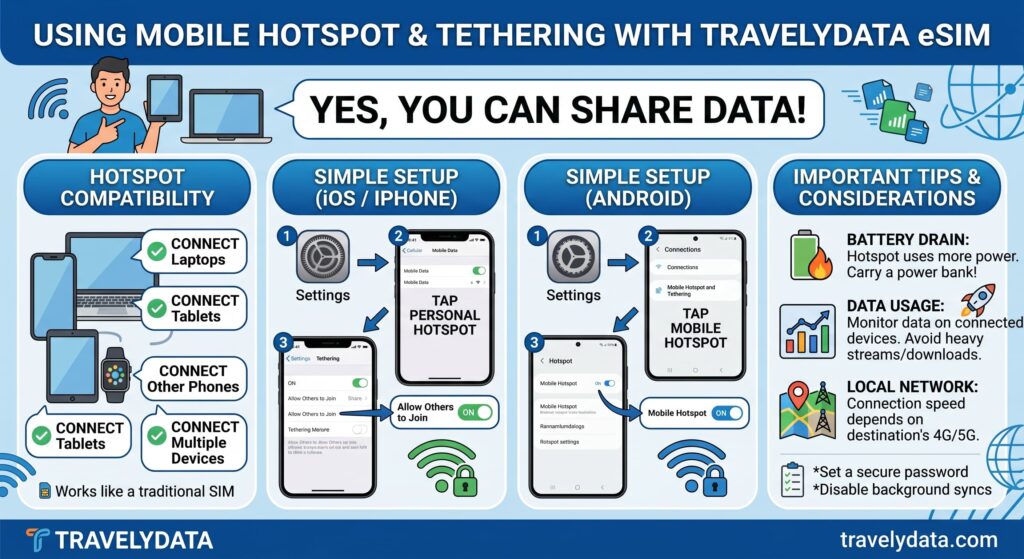
Confirming Hotspot Support
Most TravelyData eSIM packages include hotspot capabilities by default. To ensure your device can share data, verify that your eSIM is the primary data source in your cellular settings. If you encounter issues, double-check that your APN settings are correctly configured as per your activation email.
2-Step Quick Setup for iOS
- Go to Settings, select Cellular (or Mobile Data), and tap on Personal Hotspot.
- Toggle the switch for Allow Others to Join to the ON position and set your Wi-Fi password.
2-Step Quick Setup for Android
- Open Settings, navigate to Network & Internet (or Connections), and select Hotspot & Tethering.
- Tap on Wi-Fi Hotspot and toggle the switch to On to begin sharing your connection.
Pro Tip: Using a hotspot can consume battery life and data more quickly than standard usage. We recommend monitoring your balance through the TravelyData dashboard while sharing your connection.
