
Encountering a ‘No Service’ message or having no internet access immediately after installing your TravelyData eSIM can be a common hurdle, but it is usually resolved by adjusting a few simple settings on your smartphone. This guide provides a step-by-step walkthrough to troubleshoot the most frequent connectivity issues and get your mobile data working right away.
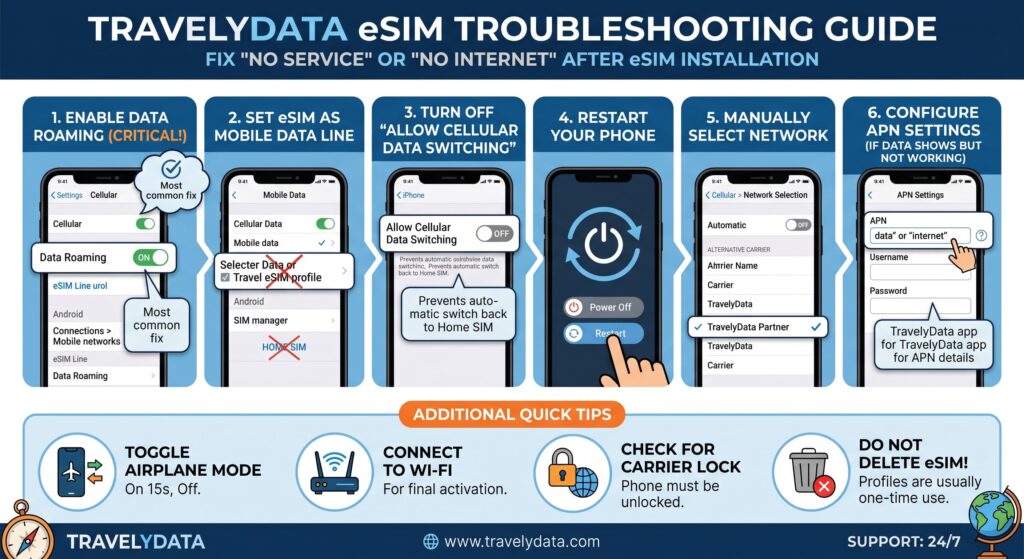
1. Enable Data Roaming
The most common reason for an eSIM not connecting is that Data Roaming is disabled. Because TravelyData eSIMs work by connecting to local networks in different countries, your device treats this as roaming. Without this setting enabled, the data connection will remain blocked.
- Go to Settings on your device.
- Tap on Cellular or Mobile Data.
- Select your TravelyData eSIM profile.
- Ensure the Data Roaming toggle is switched ON.
2. Select the eSIM as Your Primary Data Line
Dual SIM devices need to know which line to use for internet traffic. If your device is still trying to pull data from your primary physical SIM card while you are abroad, you will not have internet access. You must explicitly tell your phone to use the eSIM for data.
- Navigate to Settings and select Cellular or Mobile Data.
- Look for the Cellular Data or Mobile Data option at the top.
- Select your TravelyData eSIM from the list.
- Ensure that Allow Cellular Data Switching is turned OFF to avoid unexpected roaming charges on your primary line.
3. Try Manual Network Selection
By default, smartphones are set to find a network automatically. However, in some regions, your phone might attempt to connect to a local carrier that does not have a roaming agreement with your eSIM. Manually selecting the correct carrier can fix ‘No Service’ issues.
- Open Settings and go to Cellular or Mobile Data.
- Tap on your TravelyData eSIM.
- Tap on Network Selection.
- Turn the Automatic toggle OFF.
- Wait for the list of available carriers to populate (this may take up to a minute).
- Select the carrier mentioned in your TravelyData activation instructions or try the carrier with the strongest signal.
